A coding agent needs to execute commands, but the details matter. What directory did it use? Where did the output go? Did a timeout kill the process, or merely stop waiting? The script extension makes those details explicit in one interface for Bash and uv-backed Python.
The idea
Choose a language with mode, provide raw source in script, and give the run a short title. Optional parameters control the working directory and how long the agent waits. Python runs through uv and can declare temporary dependencies.
A Bash tool call might look like this:
{
  "mode": "bash",
  "title": "inspect changes",
  "script": "git status --short",
  "dir": ".",
  "timeout": 10
}
For Python, pass Python directly—no shell heredoc required:
{
  "mode": "python",
  "title": "summarize values",
  "script": "import statistics\nprint(statistics.mean([12, 18, 24]))",
  "timeout": 30
}
The objects above are Pi tool-call arguments, not commands to paste into a shell. For a package, add a deps array; python and stdin are also available in Python mode. Each call starts a separate process, so use dir on each call rather than relying on a previous cd.
An operational detail that matters
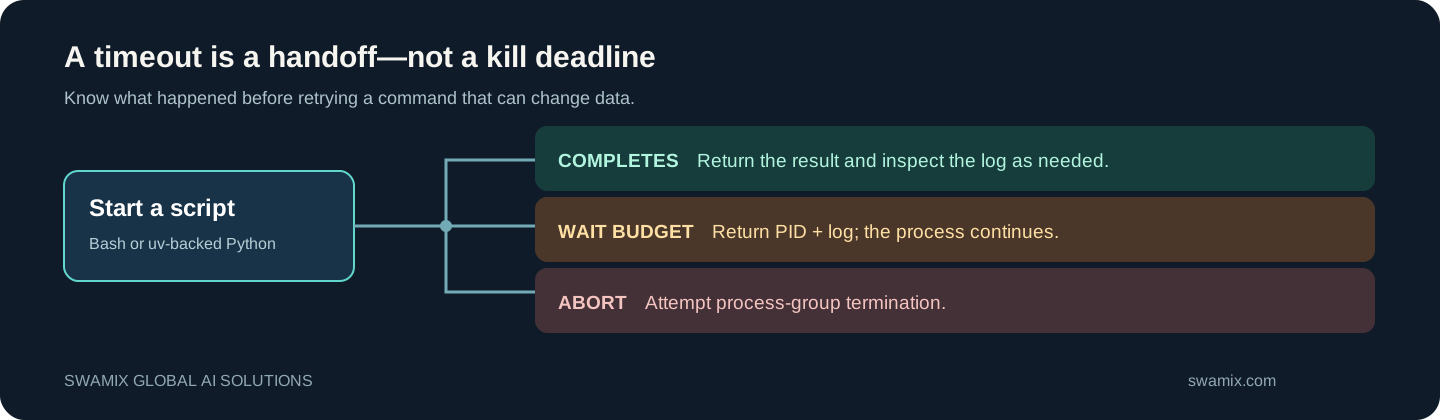
timeout is a wait budget, not a kill deadline. If it expires, the call returns a PID and log path while the process continues. Check those before retrying a command that could modify data. Explicit abort handling is separate.
Runs write source and captured output below the working directory's .pi/scripting/ folder. Returned text is bounded; the full captured log remains on disk. Those artifacts can contain sensitive information, so plan for access control and retention.
The terminal view separates code from output and uses its top border as a wait-budget indicator—not a promise of task completion. The current implementation caps each box separately and has known narrow-terminal and legacy-rendering limitations.
Installation and boundaries
Follow the full Script Tool guide. The extension registers a new script tool; it does not replace Pi's native Bash executor. Prompt guidance encourages the new tool, but a model can still choose another one. Scripts run with the Pi process's OS permissions. The command guard is not a sandbox.
This is useful when an agent needs a predictable way to run a quick calculation, inspect a repository, or execute a longer command while leaving an audit trail you can inspect.
Need a script-execution workflow adapted to your environment? Swamix Global AI Solutions can help with custom implementation and support. Contact Nikhil · swamix.com
Common questions
Does the script tool replace Pi's native Bash tool?
No. It registers a separate script tool; native Bash remains available. Model guidance can encourage the new tool but cannot force every model to use it.
Does a script timeout stop the process?
No. The timeout is a wait budget. The tool hands back a PID and log location while the process may continue, so inspect it before retrying.